Hooks & Webhooks
Hooks pause workflow execution and resume it later with external data. Workflows can wait for external events, user interactions (also known as "human in the loop"), or HTTP requests.
Understanding hooks
At their core, Hooks are a low-level primitive that allows you to pause a workflow and resume it later with arbitrary serializable data. Think of them as suspension points in your workflow where you're waiting for external input.
When you create a hook, it generates a unique token that external systems can use to send data back to your workflow. This makes hooks perfect for scenarios like:
- Waiting for approval from a user or admin
- Receiving data from an external system or service
- Implementing event-driven workflows that react to multiple events over time
Creating your first hook
This workflow creates a hook and waits for external data:
The workflow will pause at await hook until external code sends data to resume it.
We recommend using the using keyword which implements the TC39 Explicit Resource Management proposal for automatic cleanup.
See the full API reference for createHook() for all available options.
Resuming a hook
To send data to a waiting workflow, use resumeHook() from an API route, server action, or any other external context:
The key points:
- Hooks allow you to pass any serializable data as the payload
- You need the hook's
tokento resume it, but knowing the token does not authorize the caller. Check who is calling beforeresumeHook(); see Security - The workflow will resume execution right where it left off
Checking for token conflicts
Sometimes you need to know that a hook token has been claimed, but you do not want to wait for external data yet. Await hook.getConflict() for that:
Calling createHook() on its own does not register the hook; registration is only committed when the workflow suspends. Awaiting hook.getConflict() suspends the workflow to commit the hook registration, then resolves with null once the hook is registered and ready to receive payloads, or with a Run handle for the run that owns the token (see HookConflictError). For hook_conflict events persisted by older worlds that did not record the owning run's ID, getConflict() rejects with HookConflictError instead of resolving with an incomplete handle. The conflicting run's accessors are durable steps, so the workflow can inspect await conflict.status, wait on await conflict.returnValue, or cancel the owner with await conflict.cancel(). See Run idempotency for these strategies. A run started with start({ experimental_hook }) already owns its token: createHook({ token }) with that token binds to the run's start Hook, and getConflict() resolves null without suspending.
Awaiting the registration costs one write, not a round trip through the queue: the invocation that commits the registration is the one that carries on past the awaiter, and it runs the steps the workflow started beside the awaiter — as in await Promise.all([hook.getConflict(), prepare()]) — in that same invocation, once the registration is recorded. That covers the steps the invocation runs inline; a fan-out wider than the free inline slots (WORKFLOW_MAX_INLINE_STEPS, less any inline steps the invocation is still running) queues the rest alongside the hook, so await hook.getConflict() before the step when the ordering itself matters. See createHook().
Custom tokens for deterministic hooks
By default, hooks generate their own token. However, you often want to use a custom token that external systems can reconstruct. This is especially useful for long-running workflows where the same workflow instance should handle multiple events.
For example, imagine a Slack bot where each channel should have its own workflow instance:
Now your Slack webhook handler can deterministically resume the correct workflow:
Receiving multiple events
Hooks are reusable. They implement AsyncIterable, which means you can use for await...of to receive multiple events over time:
Each time you call resumeHook() with the same token, the loop receives another value.
Waiting with a timeout
Race a hook against sleep() to stop waiting after a deadline. To wait again after a timeout, create the hook's promise once and race that same promise on every attempt:
Racing a fresh hook.then() on each attempt also receives an event that arrives while that race is running. An event that arrives between races, for example while sendReminder() runs, is delivered to the awaiter left behind by the earlier race, so the workflow never sees it. Don't race iterator.next() from hook[Symbol.asyncIterator]() either. The next() call that lost a race keeps waiting and takes the next event, even one that arrives while a later race is running. Race the promise you created once instead.
Don't await one hook from several places at the same time, for example Promise.all([hook, hook]). Which event each await receives depends on how far the workflow had replayed when it awaited, so it can differ between code that looks equivalent. To receive successive events, await them one after another or iterate with for await...of.
Disposing hooks early
When a workflow ends, hooks are automatically disposed. However, you may want to release a hook token early so another workflow can use it while your workflow continues running. Use a block scope with using to control when disposal happens:
You can also manually dispose using the dispose() method:
After disposal, the hook will no longer receive events and the async iterator will stop yielding values.
Taking over a token from another run
Disposing early only works when the run holding the token cooperates. When the newest run should own a token regardless, such as a redeployed bot that must replace the run still waiting on a channel, pass experimental_force and let the runtime perform the handoff:
The run that held the token is woken and its await hook (or for await...of) rejects with HookForceClaimedError once it has drained the payloads it received before the takeover. Every resumeHook() for the token from then on reaches the new run, including one that was already in flight, so senders never notice the handoff. Several runs forcing the same token at once chain in the same way and always end with exactly one owner. A run started at a spec version below 8 cannot be taken from; the forced hook then gets an ordinary HookConflictError. See createHook() for the full semantics.
Understanding webhooks
Hooks require you to manually handle HTTP requests and route them to workflows. Webhooks provide a higher-level abstraction built on top of hooks that:
- Automatically serializes the entire HTTP
Requestobject - Provides an automatically addressable
urlproperty pointing to the generated webhook endpoint - Handles sending HTTP
Responseobjects back to the caller
When using Workflow SDK, webhooks are automatically wired up at /.well-known/workflow/v1/webhook/:token without any additional setup.
createWebhook() exposes a public route at /.well-known/workflow/v1/webhook/:token, and the token in that URL is the only authorization performed for incoming requests. Make sure to read up on security before using a webhook for calls that need to be authenticated.
See the full API reference for createWebhook() for all available options.
Creating your first webhook
Here's a webhook that receives HTTP requests. Like hooks, webhooks support the using keyword for automatic cleanup:
The webhook will automatically respond with a 202 Accepted status by default. External systems can make an HTTP request to the webhook.url to resume your workflow.
Sending custom responses
Webhooks provide two ways to send custom HTTP responses: static responses and dynamic responses.
Static responses
Use the respondWith option to provide a static response that will be sent automatically for every request:
Dynamic responses (manual mode)
For dynamic responses based on the request content, set respondWith: "manual" and call the respondWith() method on the request:
When using respondWith: "manual", the respondWith() method must be called from within a step function due to serialization requirements. This requirement may be removed in the future.
Handling multiple webhook requests
Like hooks, webhooks support iteration:
Hooks vs. webhooks: when to use each
| Feature | Hooks | Webhooks |
|---|---|---|
| Data Format | Arbitrary serializable data | HTTP Request objects |
| URL | No automatic URL | Automatic webhook.url property |
| Response Handling | N/A | Can send HTTP Response (static or dynamic) |
| Use Case | Custom integrations, type-safe payloads | HTTP webhooks, standard REST APIs |
| Resuming | resumeHook() | Automatic via HTTP, or resumeWebhook() |
Use hooks when:
- You need full control over the payload structure
- You're integrating with custom event sources
- You want strong TypeScript typing with
defineHook()
Use webhooks when:
- You're receiving HTTP requests from external services
- You need to send HTTP responses back to the caller
- You want automatic URL routing without writing API handlers
Security
A hook token tells the runtime which hook a payload belongs to. It is not an authentication mechanism, and neither resumeHook() nor the webhook endpoint checks who is sending the payload.
Generated tokens are hard to guess, not secret
When you don't pass a token, the SDK generates one inside the workflow function. Workflow code must produce the same values on every replay, so the generated token comes from the run's deterministic random number generator, the same one that backs Math.random() and crypto.randomUUID() in workflow functions. That generator is seeded from identifiers of the run, including the run ID, not from a secret key.
A generated token is hard to guess without knowing the run, but the values it is derived from are not designed to be kept secret. Treat a generated token like an unlisted link, not like a credential.
Custom tokens passed to createHook({ token }) are usually built from domain data such as an order ID, so they are even easier to reconstruct. That is what makes them useful for routing, and it is why the route that resumes them must do its own authorization. If you can not perform your own authorization on the route that calls resume for any reason, and need to generate an unguessable token instead, generate it in a step where crypto is not seeded and pass it as token:
The step result is recorded in the run's event log like any other step result. See Encryption to keep it encrypted at rest.
Webhook URLs
createWebhook() serves a public route at /.well-known/workflow/v1/webhook/:token, and matching the token is the only check it performs. Anyone who has the URL, or can compute its token, can resume the workflow with a request of their choosing. That is fine for low-stakes callbacks and prototypes. When a webhook request triggers something consequential, either:
- Verify each request before acting on it, for example by checking the provider's HMAC signature in a step with
respondWith: "manual", and keep waiting for the next request when verification fails. - Use
createHook()behind your own route and authorize the caller before callingresumeHook(), as shown below.
Authorize before calling resumeHook()
resumeHook() delivers the payload to whichever hook owns the token. The route that calls it has to authenticate the caller and check that they are allowed to resume that specific hook. Knowing the token is not proof of either. One way is to record who may resume the hook in its metadata, then compare it to the signed-in user:
Take the user identity from your authentication layer, never from the request body. Other examples in these docs omit authorization to stay short.
Randomness in workflow functions
The same determinism applies to your own code. Math.random(), crypto.randomUUID(), and crypto.getRandomValues() in a workflow function return values derived from the run's seed, so they are predictable to anyone who knows it. Don't use them for secrets, passwords, one-time codes, or any value that must be unguessable. Generate those in a step, as in the token example above.
Advanced patterns
Type-safe hooks with defineHook()
The defineHook() helper provides type safety and runtime validation between creating and resuming hooks using Standard Schema v1. Use any compliant validator like Zod or Valibot:
This pattern is especially valuable in larger applications where the workflow and API code are in separate files, providing both compile-time type safety and runtime validation.
Best practices
Token design
Custom tokens are available for createHook() with server-side resumeHook() only. Webhooks (createWebhook()) always generate their own unique tokens. Neither kind of token authorizes the sender; see Security.
When using custom tokens with createHook():
- Make them deterministic: Base them on data the external system can reconstruct, such as channel IDs or user IDs.
- Use namespacing: Prefix tokens to avoid conflicts, such as
slack:${channelId}orgithub:${repoId}. - Include routing information: Ensure the token contains enough information to identify the correct workflow instance.
Response handling in webhooks
- Use static responses (
respondWith: Response) for acknowledgments - Use manual mode (
respondWith: "manual") when responses depend on request processing - Remember that
respondWith()must be called from within a step function
Iterating over events
Both hooks and webhooks support iteration, making them perfect for long-running event loops:
This pattern allows a single workflow instance to handle multiple events over time, maintaining state between events.
Performance
Time to resume (TTR) measures how quickly a workflow that is waiting on a hook continues once your app calls resumeHook(): the clock starts at that call and stops when the first line of the workflow's next step runs. The animation shows where it starts and stops in a run.
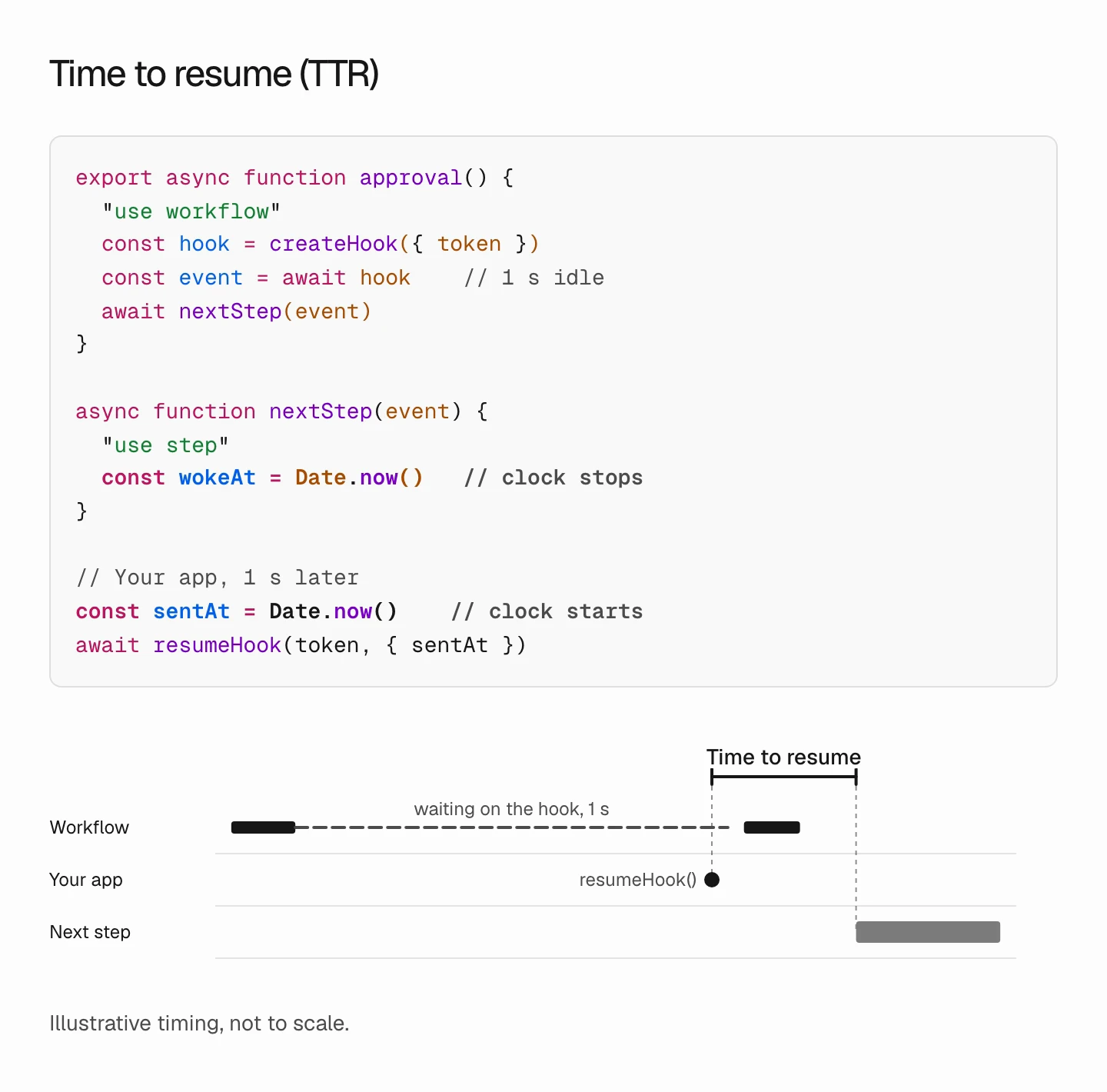
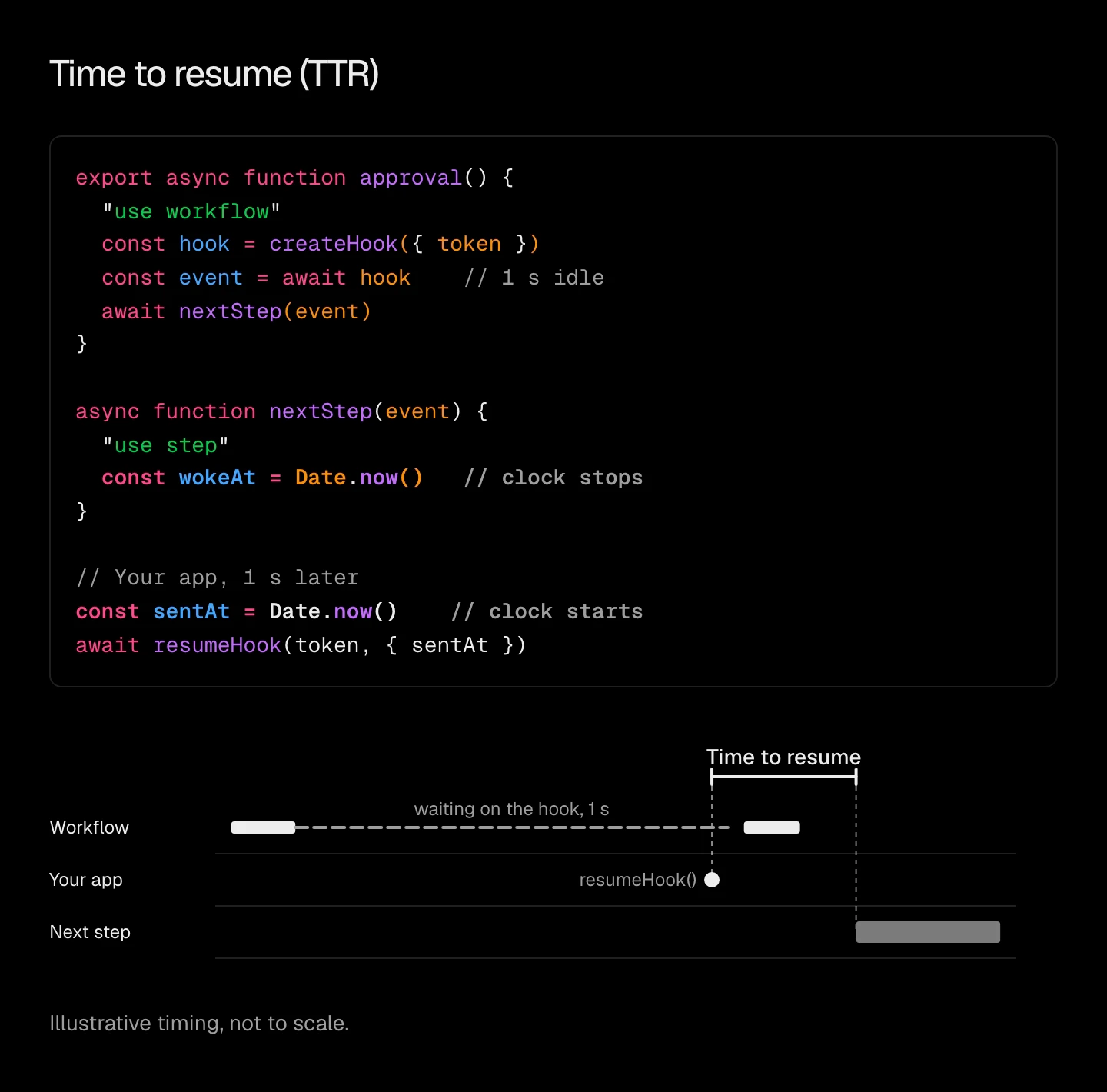
See Time to resume on the Performance page for how it's measured and the latest results.
Related documentation
- Serialization - Understanding what data can be passed through hooks
createHook()API ReferencecreateWebhook()API ReferencedefineHook()API ReferenceresumeHook()API ReferenceresumeWebhook()API Reference